

Put Vaping Heaven on Your Phone Screen Right Now
Stop Wasting Your Life in Browser Tabs: Put Vaping Heaven on Your Phone Screen Right Now
Picture the scene. You are out in your car, or standing in a draughty workshop, or halfway up a ladder trying to scoop rotting autumn leaves out of a gutter. You take a draw on your OXVA Xlim Pro 2 Kit, and instead of that crisp, punchy blast of Bar Juice 5000 Nic Salts, you get the horrific, sandpaper taste of scorching dry cotton.
Your pod is dead. Completely, utterly, irreversibly ruined.
So what do you do? You pull out your £1,200 telephone—a pocket supercomputer with more processing power than the entire Pentagon had in 1995—and you open a web browser. Immediately, you are ambushed by pure, unadulterated chaos. You have sixty-four open tabs, including an unfinished MOT booking, an angry forum debate about spark plugs for an old Alfa Romeo, three recipes for beef stew you will never cook, and a local council report about wheelie bins.
You try to type into the address bar with freezing cold thumbs, the search engine autocorrects your words into complete gibberish, an advert pops up asking if you want to buy double glazing, and by the time you actually fight your way through to order replacement pods, you have lost ten minutes of your life that you will never, ever get back.
It is infuriating. It is slow. And quite frankly, it is completely unnecessary.
You do not need to download an enormous, bloated application from an app store that demands your grandmother’s date of birth, tracks your location, and eats up 300 megabytes of memory just to sell you a pack of replacement coils.
What you need is a Progressive Web App. It takes eight seconds flat to set up. It puts the Vaping Heaven fire badge directly onto your phone screen. You tap it, you grab your gear, pay directly with your card, and get straight back to your life.
Why Native App Stores Are an Absolute Racket
Let’s be completely honest about native marketplace apps: they are a total nuisance. Silicon Valley conglomerates charge massive fees, demand endless identity checks, and force developers to wrap simple online shops inside clunky code containers that drain your battery and fill your phone with junk files.
- Massive Storage Waste: Typical marketplace apps eat up anywhere from 150 MB to 300 MB of space. The Vaping Heaven web app icon consumes under 2 MB of clean memory.
- Instant Setup: You do not have to remember an account password or verify your thumbprint across three security screens. The whole setup takes eight seconds.
- No Notification Spam: You will not get irritating marketing notifications popping up at seven in the morning telling you to look at things you do not want.
- Live Warehouse Inventory: The millisecond a fresh crate of Elf Bar ELFX Replacement Pods, Vaporesso Xros 4 Pod Kit units, or SKE Crystal Salts arrives at our UK distribution hub, it shows up on your screen. You aren't stuck waiting for an app store update to download over motorway services Wi-Fi.
- Direct Performance: It launches instantly without sluggish webview frames, taking you straight to the checkout.
The Lightning Setup: Four Quick Taps
- Load the Vaping Heaven storefront cleanly on your phone's main browser.
- Tap the Share Box on an iPhone or the Three Dots on an Android handset.
- Select Add to Home Screen or Install app from the menu options.
- Hit Add or Install to confirm, and the fire badge hits your screen immediately.
1. iPhone Users: How to Hammer It Onto iOS
Apple hates letting you do anything simple because they would prefer you spend your entire life trapped inside their corporate walled garden paying monthly rent for digital cloud storage you do not need. But hidden right inside Safari is a proper shortcut button that bypasses all the nonsense.
The Steps for iPhone
- Go straight to the Vaping Heaven website. Do not do this inside Instagram’s or Facebook’s built-in browser windows. Use proper Apple Safari.
- Look down at the bottom of your phone screen. Right in the middle of the toolbar is a little square with an arrow pointing straight up out of it. Hit that Share button.
- You will see a row of contacts you haven't spoken to since 2019. Ignore them. Scroll down past them to the list of actions and tap Add to Home Screen. It has a neat little square icon with a plus sign in it.
- In the top right corner, tap the word Add. Do not fiddle with settings. Do not overthink it. Just tap it.
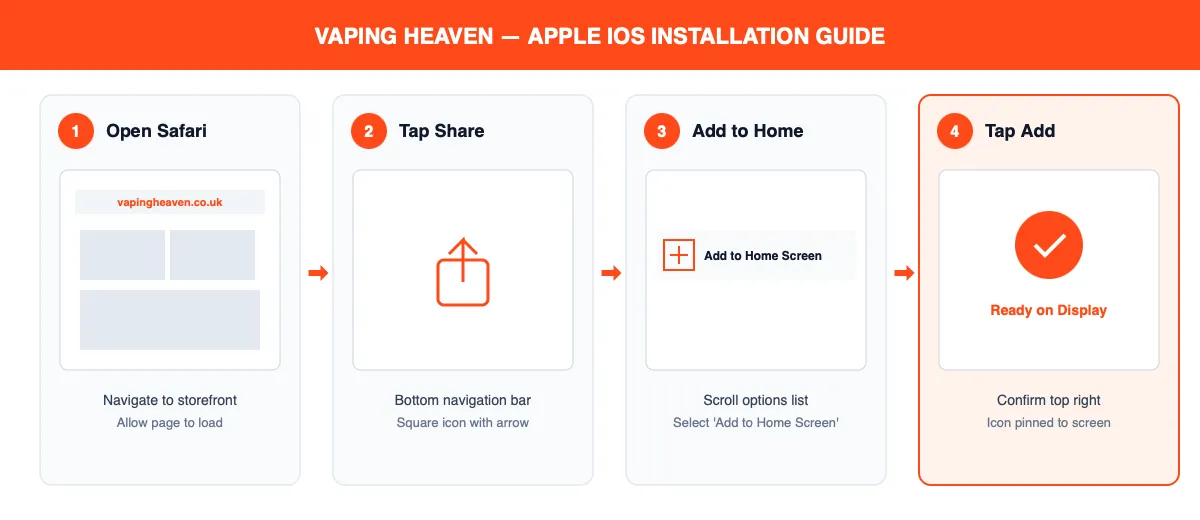
Job done. Look at your home screen. Sitting right there alongside your banking app and WhatsApp is the Vaping Heaven icon. Tap it, and it doesn't open Safari with its clumsy tabs and bookmarks—it launches full screen, razor-sharp, and ready for business.
2. Android Users: Pure, Unadulterated Speed
If you are using an Android, congratulations: you’ve chosen an operating system that doesn't treat you like a village idiot. Google Chrome lets you pin websites straight to the engine room of your phone in about three quick taps.
The Steps for Android
- Bring up the Vaping Heaven storefront on your Google Chrome browser.
- Up in the top right-hand corner of the screen, you will spot three little vertical dots. Tap them to open the menu.
- In that dropdown list, Chrome is clever enough to recognize that our site is built properly. Tap Install app (or on older handsets, Add to Home screen).
- A confirmation box will jump onto the screen. Do not sit there debating the meaning of life—tap Install.
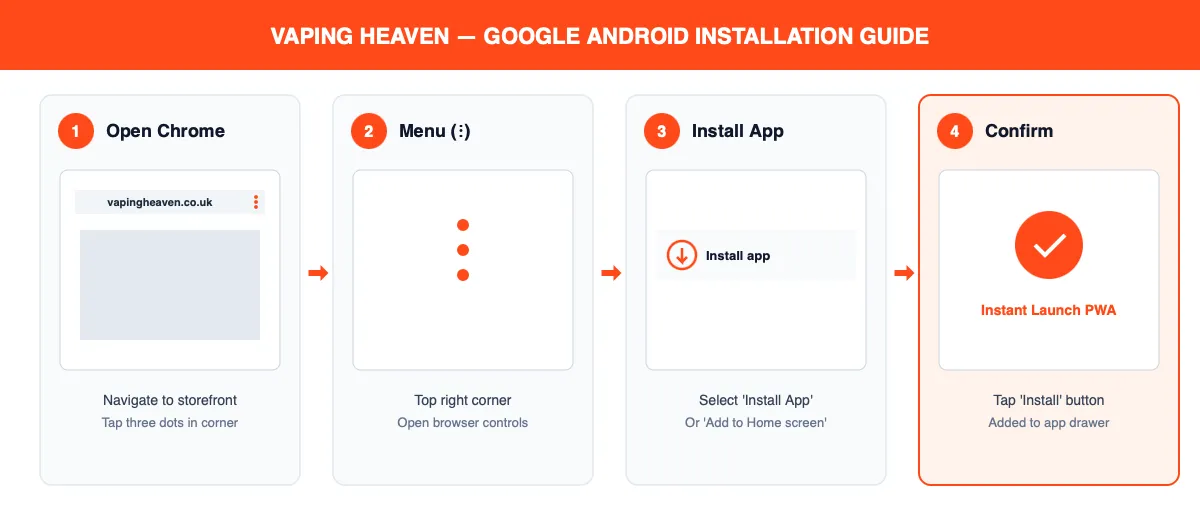
Android will drop the icon onto your phone screen immediately. No waiting for a massive file to download over a sluggish mobile network mast, no password checks, no faffing about.
Quick Checkout & The Zero-Panic Emergency Restock List
When you tap through to checkout, our payment gateway processes credit and debit cards directly using bank-grade UK encryption. None of that faffing around with third-party digital wallets that randomly decide to block or cancel orders from independent vape stores. You enter your card, approve the transaction, and Royal Mail is handed your package before you have even finished your mug of tea.
Now that you have the Vaping Heaven badge pinned directly to your screen, you have effectively bulletproofed your daily vape routine against catastrophic disasters.
The Essential Emergency Kit
- Voopoo Argus G2 Kit: Keep a backup pack of Voopoo Argus Top Fill Pods in your glove box.
- Vaporesso Luxe XR Max Pod Kit: Always keep a spare strip of Vaporesso GTX Coils in your coat pocket.
- Vampire Vape 10ml: Keep two unopened bottles on standby so you never run dry unexpectedly.
- Hayati Pro Max Plus Prefilled Pod Kit: A dependable backup device ready to go if you leave your primary kit behind.
The next time you drop your pod on a concrete driveway, burn out a coil on a Friday night, or realise you are down to your very last millilitre of Seriously Salty 10ml Nic Salts, do not open a browser and go wandering through the digital wilderness.
Reach for your telephone, hit the Vaping Heaven icon, tap your order through, pay securely with your card, and get straight back to what you were doing. Fast, simple, job done.